Camera-measured physiotherapy

Rehab that counts every degree.

Motus guides patients through their prescribed exercises with a 3D coach, scores every rep through the phone's camera, and sends real range-of-motion numbers back to their clinician. No sensors, no wearables — and video never leaves the phone.

Runs in the browser on any phone, tablet or laptop with a camera.

STOCK PHOTO — patient mid-exercise at home, side-on to a propped phone, living-room setting (landscape)
The Motus app showing the 3D coach demonstrating a mini squat
126°KNEE FLEXION · WK 3
46tracked exercises, one engine
40clinical functions with sourced normal ranges
3vision models — body, hand, face
0video uploads. Ever.
The recovery ramp · W1 → W12

From prescription to progress, one loop.

A clinician sets where the patient starts and where they should get to. Motus divides the distance into weekly targets and walks the patient there, one measured rep at a time — and everything measured flows straight back.

STEP 1

Prescribe in minutes

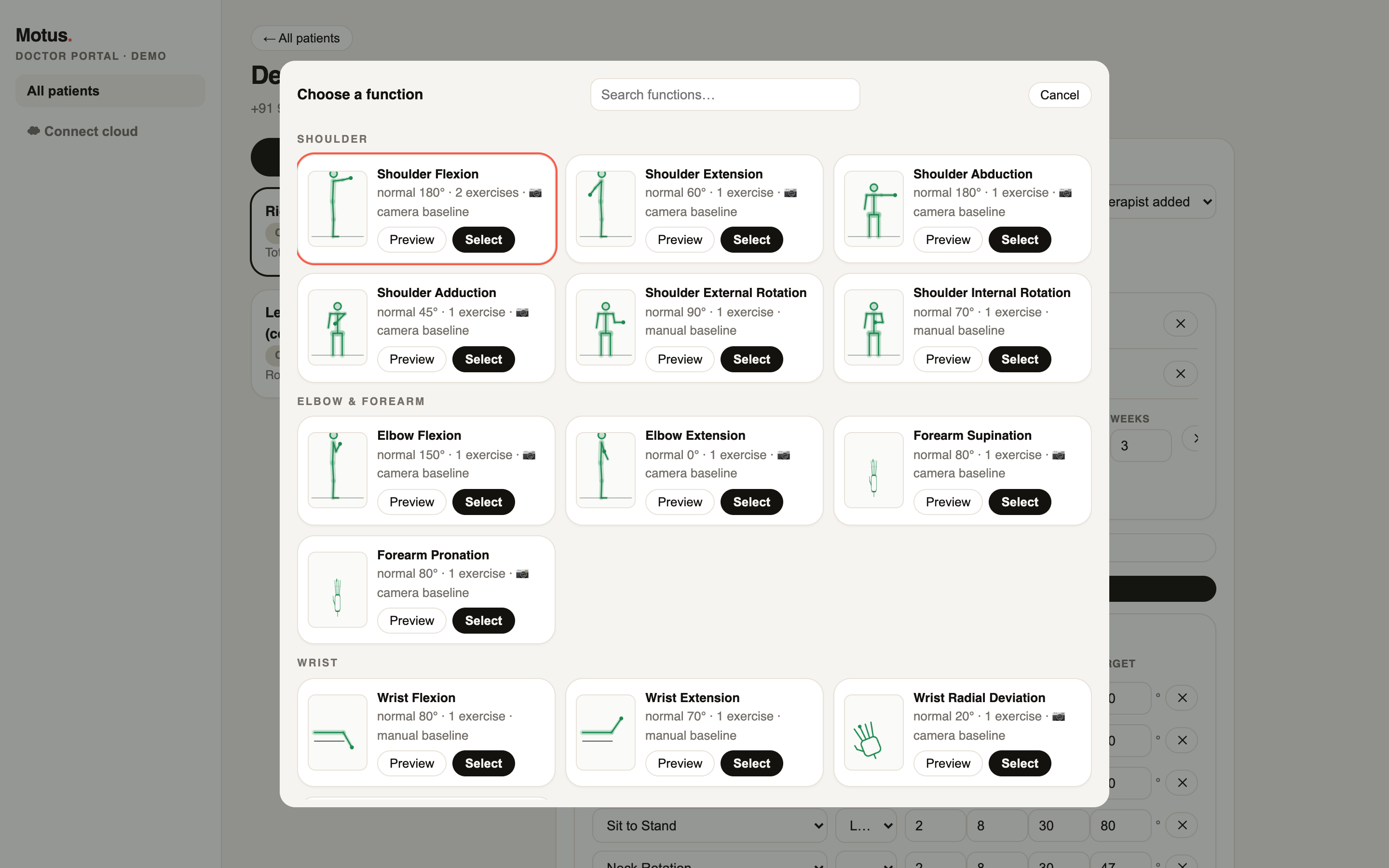
Pick clinical functions — knee flexion, cervical rotation, finger extension — from a visual library with previews of every movement. Set a target and a number of weeks; Motus writes the week-by-week ramp onto every exercise, per side where it matters.

40 functions · 46 exercises · 10 body regions left/right tracked separately
The function library: region-grouped cards with previews
STEP 2

Baseline on camera

In clinic, the patient moves to their comfortable limit and holds for three seconds — best of three attempts becomes the baseline. It anchors the whole ramp, so the starting point is measured, not estimated from memory.

29 functions baseline by camera 3-second holds · best of 3
STOCK PHOTO — clinician holding a tablet toward a patient in a clinic room
STEP 3

Train with the coach

Every exercise opens with a 3D demonstration while the instructions are spoken. Then the camera takes over: each rep only counts when the joint truly reached its band and held — with live spoken coaching, so nobody squints at a screen mid-exercise.

voice-first: reps, form cues, framing help pauses scoring when it can't see
The 3D coach demonstrating an exercise on the patient's phone
STEP 4

Progress flows back

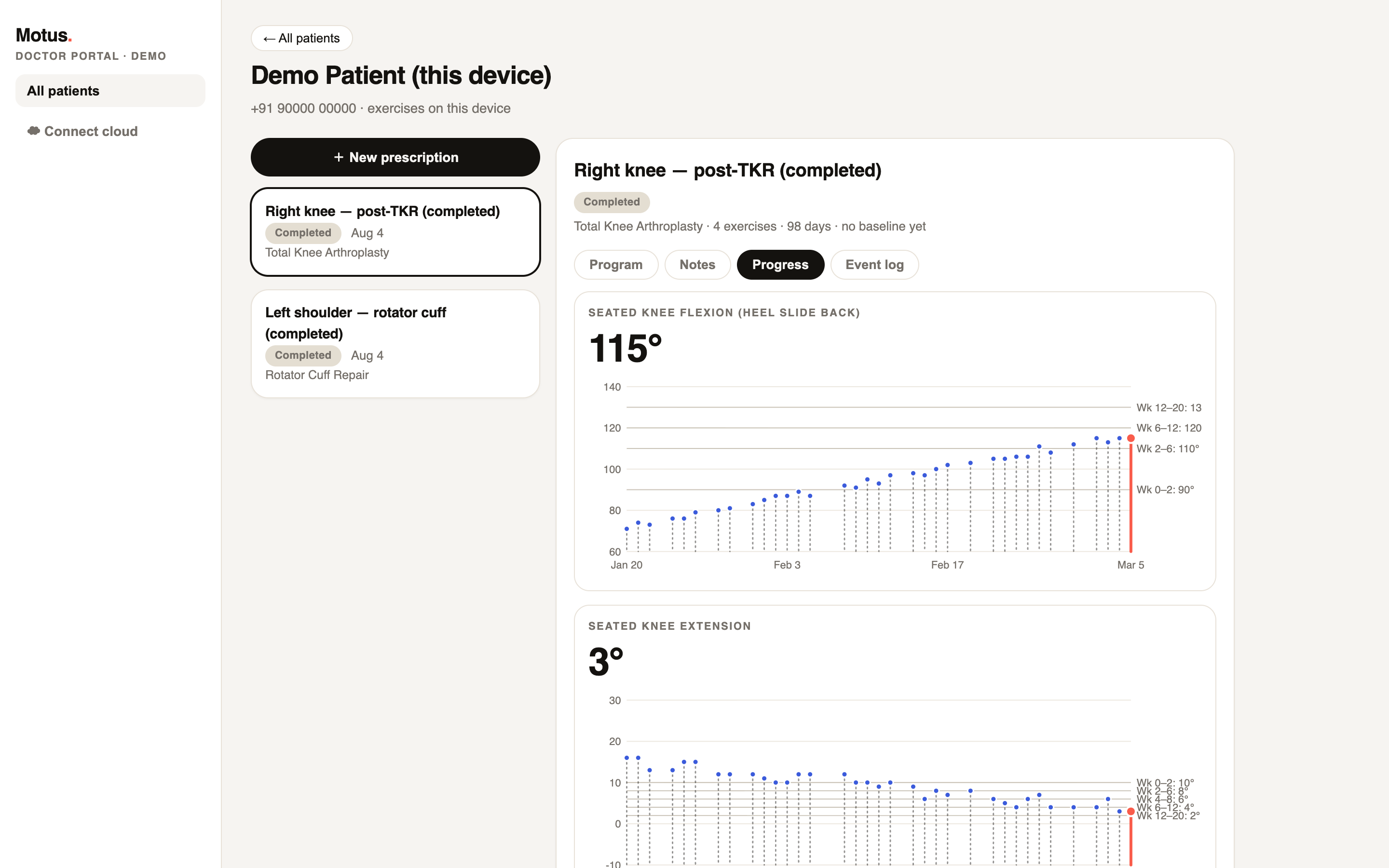
Range-of-motion trends against goal lines, pain before and after every session, adherence with honest gaps, red-flag events — all in the clinician's portal the moment the session ends. The app reports; the clinician decides.

ROM · pain · adherence · red flags baseline vs endline assessments
Progress charts in the clinician portal
The camera stage · on-device

Measurement, not motivation theatre.

Every exercise is scored as a confirmed movement cycle between clinically tuned bands — a rep only counts when the joint really got there and held. These are the actual in-app coaches, running live on this page.

Mini squat · knee
Knee raise · hip
Lateral raise · shoulder
Heel slide · post-TKR
fail loud, never wrong

An inverted setup scores zero reps rather than a plausible wrong number. Unusable targets are rejected, not fudged.

sees only what it needs

An elbow exercise never asks for your knees. Framing, silhouettes and guidance are scoped to the joint being measured.

right model per joint

Body pose for limbs, a 21-point hand model for fingers and wrists, face geometry for the neck — each movement uses the vision model that measures it best.

The coach · 3D

See the movement before you make it.

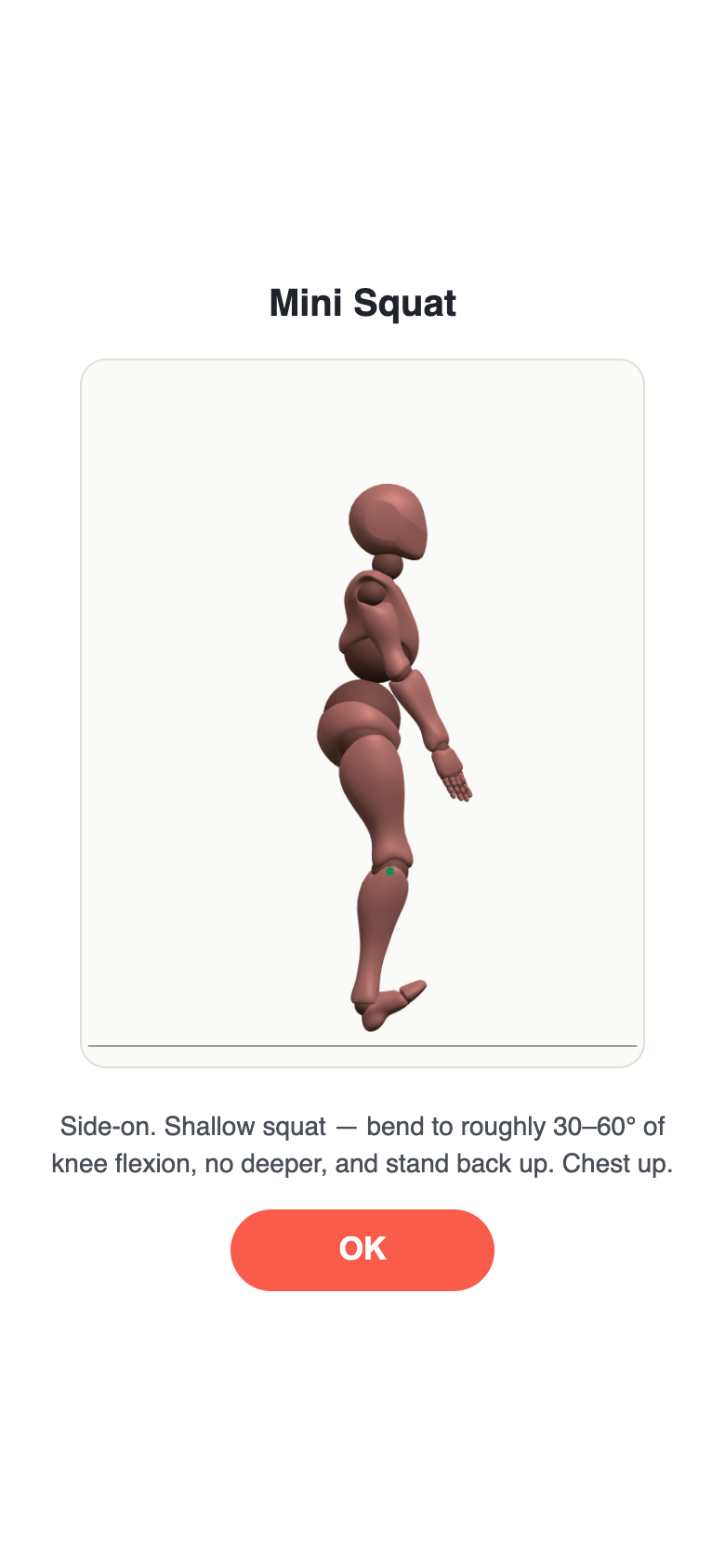
Every exercise opens with a full-screen 3D demonstration while the instructions are spoken aloud. Mid-exercise, one tap brings the coach back — side by side with the exact guide on screen. The phone below is running the real thing.

  • 3D character demonstrations for all 46 exercises
  • Voice-first coaching — reps, form cues and framing help, spoken
  • Guides generated from the same angles the scorer measures

Mini Squat

Side-on. Shallow squat — bend to roughly 30–60° of knee flexion, no deeper, and stand back up. Chest up.
OK
The portal · functions first

Prescribe intent, not just exercise lists.

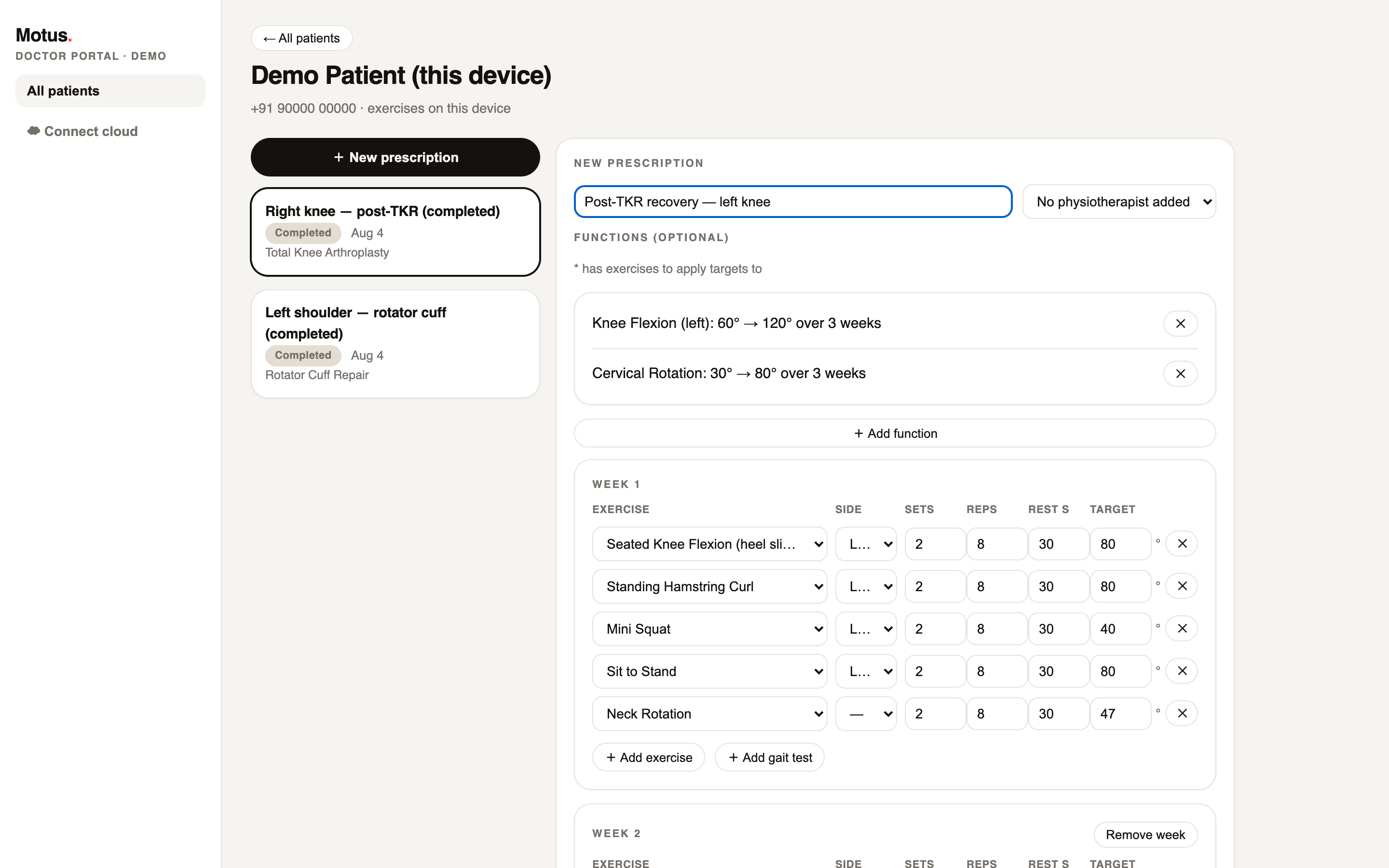
Clinicians prescribe in the language they already use — functions with a baseline, a target and a number of weeks. Motus turns that into per-week scoring bands for every exercise, per side where it matters.

  • Visual function and exercise libraries with live previews
  • Camera baselining: 3-second holds, best of three, side-tagged
  • Normal ranges sourced to published standards — every number cited
The prescription builder: functions with baseline-to-target ramps and per-week exercise targets
The library · 46 exercises

Every movement, browsable and previewable.

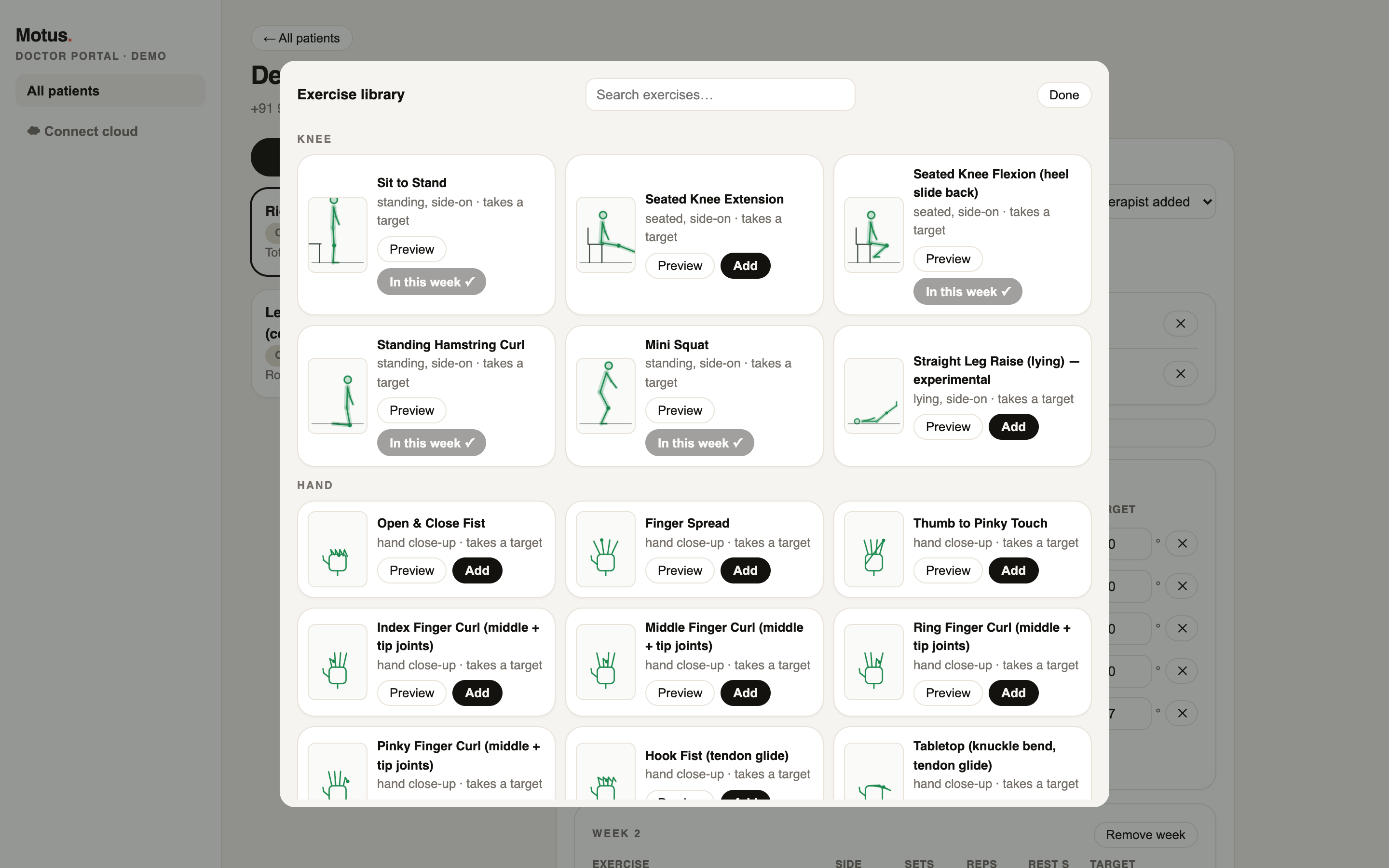
Ten body regions, from post-TKR knee work to per-finger tendon glides. Each entry shows its setup, whether it takes a weekly target, and a one-tap preview of the movement itself.

  • Knee, hip, shoulder, elbow, wrist, hand, ankle, neck, back, gait
  • Post-surgical staples: heel slides, tendon glides, chin tucks
  • Added to a plan, an exercise lands in every week — targets included
The exercise library: grouped, searchable, with guide thumbnails and previews
Shared care · 3 players, one loop

Doctor, physiotherapist, patient — connected into care.

ONE RECORD Doctor sets the intent Physio runs the program Patient trains, measured

Either clinician prescribes

Doctor and physiotherapist share the same full portal — functions, camera baselining, libraries, progress. Whoever sees the patient first can start the program.

Shared with one click

Add the other clinician to a prescription's header and it appears in their portal too. Private prescriptions stay private.

One notes trail

Doctor and physio notes append to a single timestamped record — every entry carries its author's name and role, visible to both.

Privacy by architecture, not by promise.

All movement tracking runs on the patient's own device. Only derived numbers — joint angles, rep counts, pain ratings — are ever stored or shared. Raw video has nowhere to go: there is no upload path in the product.

Ready when you are · 0° → 120°

Put a measured recovery
in your patients' pockets.